
Never ask twice
The sound around you reaches your headphones instantly and more clearly. Dial it in anywhere between 1.0× and 12.0×, to your own ear.
Starts with a single tap. No setup, no pairing, no account.
Duyarim sends the sound around you straight to your headphones — instantly and more clearly. The person across from you talks normally; you hear it the first time.
Duyarim runs in your browser: nothing to download, install or sign up for. The iPhone app is live on the App Store; the Android version will be downloadable here the day it reaches Google Play.
Duyarim does not run in the browser on iPhone or iPad; the mobile app is the only way.
This product is not a medical hearing aid and is not intended for diagnosis or treatment.
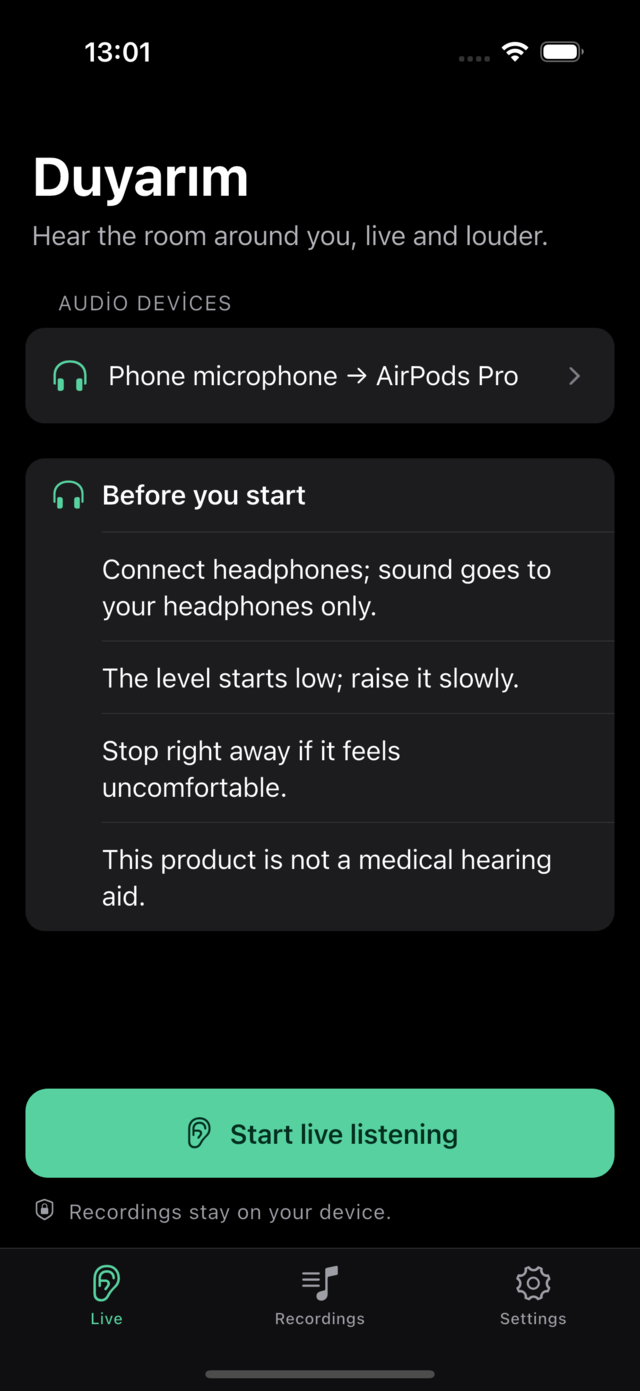
The sound around you reaches your headphones instantly and more clearly. Dial it in anywhere between 1.0× and 12.0×, to your own ear.
Starts with a single tap. No setup, no pairing, no account.
While you listen, the session records itself. Play back the appointment time, the name of a medication, an address — you never have to remember to hit record.
Don't want recordings? Turn them off in Settings with one tap.
No account to create, and audio never reaches a server. Recordings stay only on your device.
Delete the app and the recordings go with it.
No cloud in between, no account, no waiting. We simply shorten the path between your phone's microphone and your ears.
Bluetooth or wired — both work. The app shows the input and output device on a single line, along with a note on latency and quality.
Sound goes only to your headphones; listening won't start without a pair connected.
One big button opens the microphone and sends the room's sound to the selected output. The volume starts low; you raise it gradually.
It keeps running with the screen locked, and you can stop it from the notification.
The session is saved automatically and listed under Recordings. Rename it, trim it, replay it — or delete it.
Sharing is the only way audio leaves your device; the choice is yours.
Open app.duyarim.com and put your headphones in. No download, no install, no account — the same app, inside your browser.
Open the address and the app is right there. The same interface runs on a computer, a tablet, or your phone's browser.
No store account, no download, no update step.
Choose “Add to Home Screen” in your phone's browser and Duyarim opens full screen with its own icon — no address bar in sight.
Safari on iPhone and Chrome on Android support this directly.
In the browser too, microphone audio never reaches a server: the processing happens inside the tab, and recordings sit in the browser's storage on your device.
Clear your browser data and the recordings go with it.
The slider is split into three levels. Before moving into High or Maximum, the app asks for your explicit confirmation.
Everyday conversation. Starts right away, no confirmation needed.
Noisy places. Confirmed on entry; feedback becomes more likely.
Carries a risk of hearing damage over long sessions. Keep the volume down.
Duyarim has no free tier and no trial period. In return you see no ads, create no account, and hand your data to nobody.
For a specific day, lecture or trip. The most flexible option for a short-term need.
If you will use it regularly, clearly cheaper than four weeks of the weekly plan.
Pay once and keep it. Cheaper than four months of the monthly plan, and it never renews.
There is no free trial; you pay from day one. The weekly and monthly plans renew automatically at the same price unless cancelled at least 24 hours before the period ends — in the app store versions you cancel from your device’s App Store or Google Play subscription settings, and in the browser version from the app’s Settings screen; deleting the app does not cancel a subscription. Lifetime is a one-time purchase: it does not renew and there is nothing to cancel. Amounts are in US dollars; the app stores show a local price for your country and taxes may be added. See the terms of use for details.
Sales terms: distance sales agreement · delivery and refund terms · seller details.
Every session is listed with its date, duration and size. Search by name, rename, trim. Delete the app and the recordings go with it.
Duyarim has no server that processes audio. Recordings stay only on your device.
Neither the microphone stream nor your recordings travel over the network. The network is used only to check whether your subscription is valid, and that request carries no audio.
Consent for recording is asked separately and explicitly; onboarding screens are not a consent step.
Read the full privacy policyNo. Duyarim is not a medical hearing aid and is not intended for diagnosis or treatment. It's an assistive listening app that plays the sound around you into your headphones, live and amplified. If you suspect hearing loss, see a specialist.
Yes. Duyarim plays the sound around you into your headphones only — Bluetooth or wired, either works. There is no output to the phone speaker, because a speaker that close to the microphone causes feedback (howling) and doesn't deliver the listening experience the app is built for.
Yes. Session recording starts only with your explicit consent on first launch, and it can be turned off in Settings with one tap. While it's off, no session is ever written to disk.
Only inside the app's own storage. Nothing is written to the cloud, your photo library or the phone's shared media folder. Unless you share it, audio never leaves the device; delete the app and the recordings go with it.
Yes. Live listening continues in the background, and you can stop it from the notification with one tap.
Pay yes, account no. Duyarim needs a paid plan: $4.99 a week, $12.99 a month, or $49.99 once for lifetime access; there is no free version and no trial. You never create an account or sign in inside the app. If you buy from the App Store or Google Play, the purchase is tied to your store account; in the browser version you buy directly from us and your access is tied to the email address you enter at checkout.
Yes. Open app.duyarim.com and the browser version runs right there — no download, no install, no account. Current Chrome, Edge and Safari are supported; headphones and microphone permission are required here too. Choose “Add to Home Screen” in your phone's browser and Duyarim opens full screen with its own icon.
On your device, in the storage the browser sets aside for Duyarim. Nothing is uploaded to a server, nothing lands in your downloads folder, and no other site can reach it. To hold on to a recording, share or download it to your device; clear your browser data and the recordings go with it.
Starts with a single tap. No setup, no pairing, no account. The volume starts low; you stay in control.
Live on the App Store and in the browser · Google Play soonThis product is not a medical hearing aid and is not intended for diagnosis or treatment.